
728x90
1. 정의: Camera Calibration
Camera Calibration(카메라 보정)이란 카메라의 내부 파라미터(초점거리, 광학 중심점)와 왜곡 파라미터(렌즈 왜곡)를 추정하여 정확한 영상 좌표계를 구축하는 과정입니다. 일반 카메라는 렌즈 특성으로 인해 배럴 왜곡(Barrel Distortion), 핀쿠션 왜곡(Pincushion Distortion)과 같은 이미지 왜곡이 발생합니다. Camera Calibration은 이러한 왜곡을 수학적으로 보정하여 실제 공간과 영상의 기하학적 관계를 정확히 일치시키는 과정입니다.
2. 설명: OpenCV에서의 Calibration 과정
OpenCV에서는 cv::calibrateCamera() 또는 cv2.calibrateCamera() 함수를 활용해 카메라 보정을 수행합니다. 일반적인 과정은 다음과 같습니다.
1) 체스보드(Chessboard) 패턴 준비
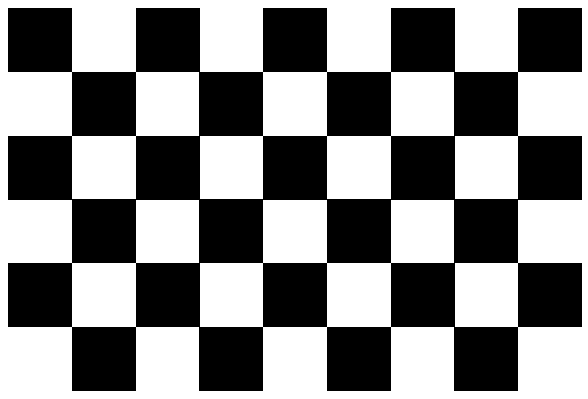
가장 널리 사용되는 패턴으로, 검정/흰색 체스보드의 내부 코너(예: 9×6)를 인식하여 코너 좌표를 추출합니다.
2) 이미지에서 코너 탐지
findChessboardCorners() 함수로 코너 좌표를 감지하여 2D 이미지 좌표로 저장합니다.
3) 실제 3D 좌표 생성
체스보드 한 칸의 실제 크기(예: 25mm)를 기준으로 3D 좌표(Object Points)를 생성합니다.
4) Camera Calibration 수행
calibrateCamera()는 다음과 같은 값을 계산합니다:
- Camera Matrix(K)
- Distortion Coefficients
- Rotation Vectors
- Translation Vectors
5) Undistortion(왜곡 보정)
undistort()를 통해 계산된 파라미터로 왜곡된 이미지를 보정합니다.
3. 예제 (Python & C++)
Python 예제
import cv2
import numpy as np

pattern_size = (9, 6)
objp = np.zeros((pattern_size[0] * pattern_size[1], 3), np.float32)
objp[:, :2] = np.mgrid[0:9, 0:6].T.reshape(-1, 2)

obj_points = []
img_points = []

images = ["img1.jpg", "img2.jpg", "img3.jpg"]

for fname in images:
    img = cv2.imread(fname)
    gray = cv2.cvtColor(img, cv2.COLOR_BGR2GRAY)

    ret, corners = cv2.findChessboardCorners(gray, pattern_size)
    if ret:
        obj_points.append(objp)
        img_points.append(corners)

ret, mtx, dist, rvecs, tvecs = cv2.calibrateCamera(
    obj_points, img_points, gray.shape[::-1], None, None)

print("Camera Matrix:\\n", mtx)
print("Distortion Coeffs:\\n", dist)
C++ 예제
#include <opencv2/opencv.hpp>
#include <vector>
using namespace cv;

int main() {
    Size patternSize(9, 6);
    std::vector<std::vector> objPoints;
    std::vector<std::vector> imgPoints;

    std::vector objp;
    for (int i = 0; i < patternSize.height; i++)
        for (int j = 0; j < patternSize.width; j++)
            objp.push_back(Point3f(j, i, 0));

    std::vector images;
    glob("images/*.jpg", images);

    for (auto &fname : images) {
        Mat img = imread(fname);
        Mat gray;
        cvtColor(img, gray, COLOR_BGR2GRAY);

        std::vector corners;
        bool found = findChessboardCorners(gray, patternSize, corners);

        if (found) {
            imgPoints.push_back(corners);
            objPoints.push_back(objp);
        }
    }

    Mat cameraMatrix, distCoeffs;
    std::vector rvecs, tvecs;

    calibrateCamera(objPoints, imgPoints, Size(640, 480),
                    cameraMatrix, distCoeffs, rvecs, tvecs);

    std::cout << "Camera Matrix:\\n" << cameraMatrix << std::endl;
    std::cout << "Distortion Coeffs:\\n" << distCoeffs << std::endl;

    return 0;
}
</std::vector</std::vector
- 아래는 9X6 체스보드 패턴의 예입니다.
728x90
'영상처리 도구' 카테고리의 다른 글
| OpenCV Feature Detection 특징점 추출 방법 (SIFT, SURF, ORB) (0) | 2025.12.06 |
|---|---|
| OpenCV 드로네 삼각분할과 보로노이를 이용한 2D 공간 분석 방법 (0) | 2025.12.05 |
| OpenCV 색 공간 비교로 배우는 영상처리 개념 (RGB, HSV, LAB, YCrCb) (0) | 2025.11.30 |
| OpenCV 이미지 크기 조절 방법 (Resize, Scaling) (0) | 2025.11.28 |
| OpenCV 이미지를 읽고, 보여주고, 저장하는 방법 (Python, C++) (0) | 2025.11.18 |